
How to Authorize a Qoo10 Store in OSL Overseas Warehouse
1. Scenario and Purpose
By applying for an API Key (API ID and Certification Key) in the Qoo10 developer backend, you can bind a Qoo10 store in the OSL Overseas Warehouse System. After authorization, you can automate operations such as order synchronization, logistics label printing, and shipping status callbacks.
2. Prerequisites
- Qoo10 store approval has been completed.
- Service score and delivery score must both be above 0 (all displayed items must be above 0).
- No unresolved issues (including delayed shipments, unanswered customer inquiries, or complaint cases). If a case is in "in progress" status but confirmed to be a long-unresolved complaint, it must be fully resolved before applying.
3. Steps
Step 1: Go to the Qoo10 Developer Backend
Open the Qoo10 API developer page: https://developer.qoo10.jp/GMKT.INC.Gsm.Web/APIDev/APIDevelopPage.aspx
Log in with your Qoo10 seller account. After logging in, click 「API ID签发/查询」 (API ID Issuance/Inquiry) in the left menu to enter the API ID issuance page. 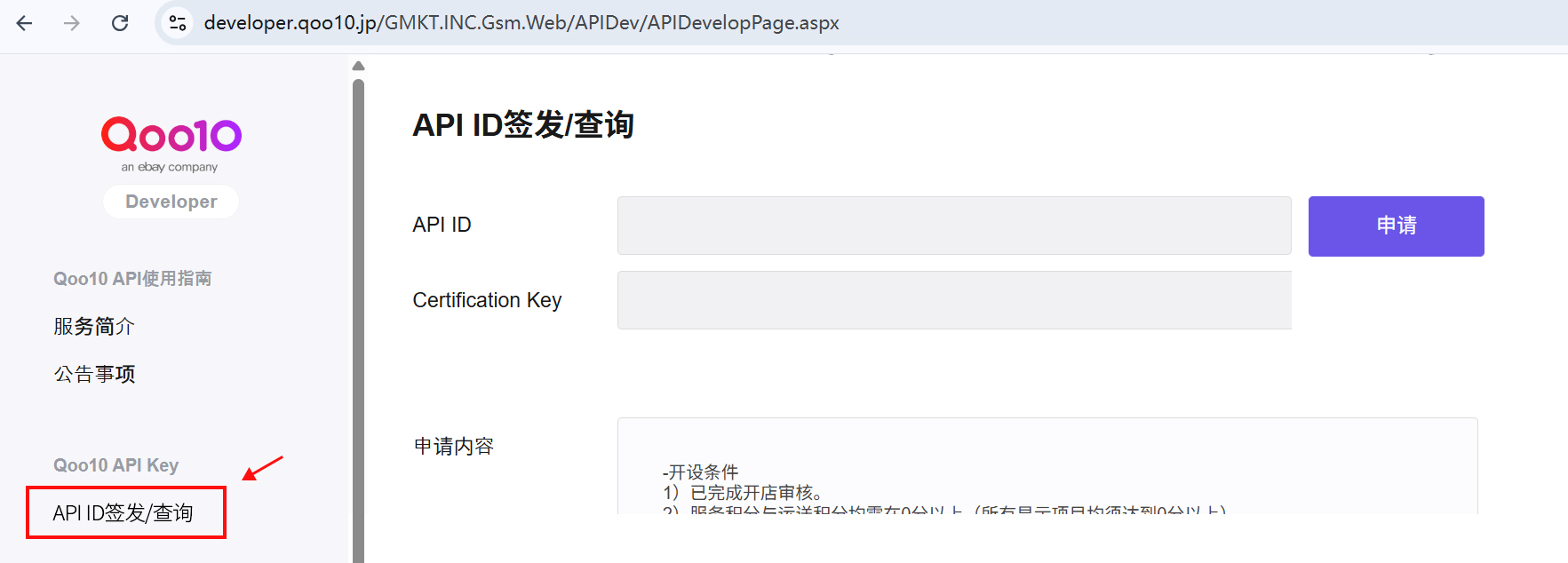
Step 2: Apply for API ID
On the "API ID Issuance/Inquiry" page:
- The page will display the "Application Content" section, listing the requirements (store approval, service score, unresolved issues, etc.).
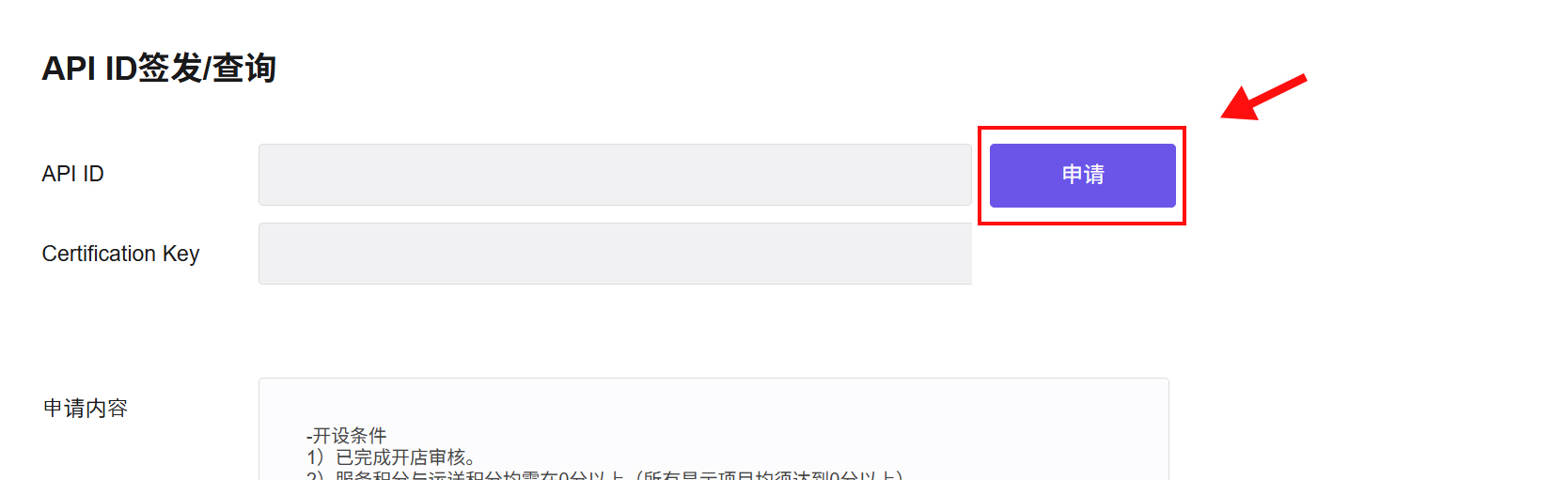
- After confirming that all requirements are met, click the 「申请」 (Apply) button on the right to open the application form.
Step 3: Fill in Application Information
In the pop-up application form, fill in the following:
| Field | Description |
|---|---|
| Store ID | Your Qoo10 store number |
| Product Category | Select the main product category of your store |
| API Usage Purpose | Briefly describe the purpose of using the API (e.g., integrate with OSL Overseas Warehouse System for order sync and shipment management) |
| API Partner Company | Enter the company name for API integration (e.g., OSL) |
After completing the form, click 「申请完成」 (Submit Application). 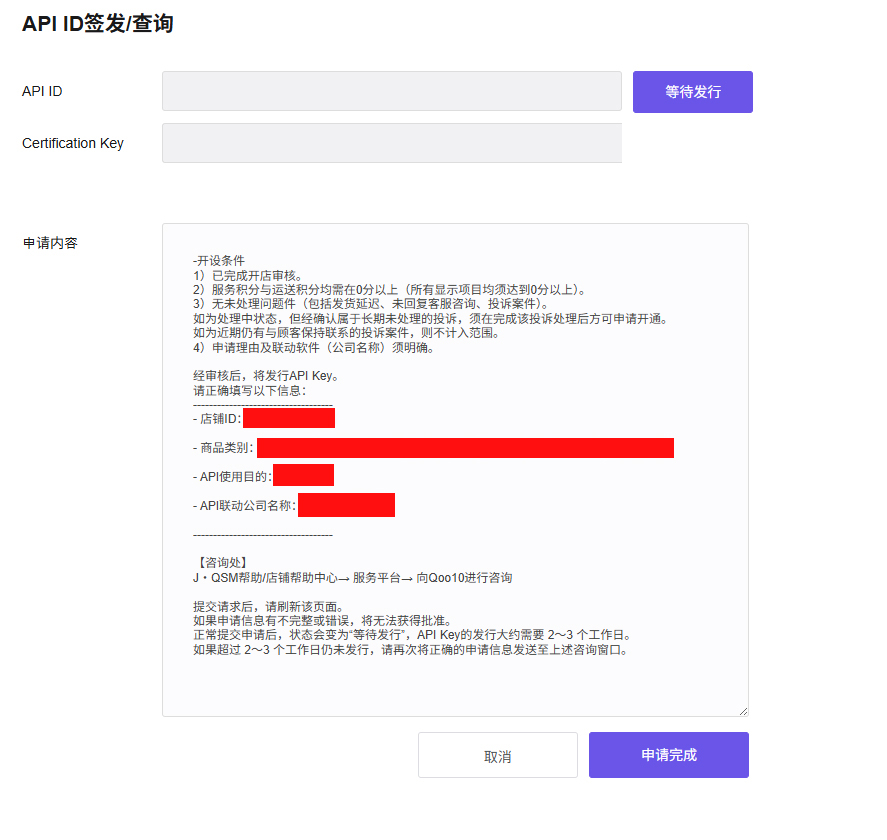
Note:
- After submitting, please refresh the page. If the application information is incomplete or incorrect, it will not be approved.
- After normal submission, the status will change to "Awaiting Issuance," and API Key issuance takes approximately 2–3 business days.
- If it has not been issued after 2–3 business days, please send the correct application information again to the inquiry window: J・QSM Help / Store Help Center → Service Platform → Submit inquiry to Qoo10.
Step 4: Wait for Approval
After submitting the application, the page status will show "Awaiting Issuance". The API ID and Certification Key fields will be empty; you need to wait for Qoo10 to complete the review.
Step 5: Obtain API ID and Certification Key
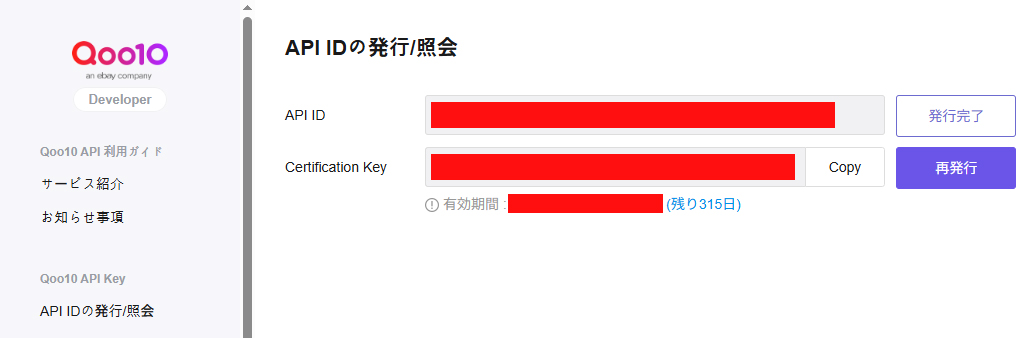
After approval, log back into the developer page. The page will display the issued API ID and Certification Key:
| Field | Description |
|---|---|
| API ID | Your API access credential ID; status shows "Issuance Complete" |
| Certification Key | Your API access credential key; click the 「Copy」 button on the right to copy to clipboard |
| Validity Period | The expiration date of the API Key; after expiration, click 「再发行」 (Reissue) to obtain a new one |
Tip:
- The Certification Key is a sensitive credential. Please keep it secure and do not share it with unauthorized personnel.
- If the Certification Key is leaked or expired, click 「再发行」 (Reissue) to generate a new key; the old key will be automatically invalidated.
- Please note the validity period and renew it before expiration to avoid disrupting order synchronization and shipping callbacks.
Step 6: Enter Authorization in OSL Overseas Warehouse
Copy the obtained API ID and Certification Key, then return to the OSL Overseas Warehouse System platform store authorization settings page:
- Go to Left Navigation → System Settings → Platform Authorization.
- Select the Qoo10 platform.
- Paste the
API IDandCertification Keyinto the corresponding input fields. - Click 「Save」 to complete the store binding.
After successful binding, the system will automatically sync Qoo10 store orders and return logistics information after shipment.
4. FAQ
What to do if the API Key application is rejected?
Please check the following:
- Has the store approval been completed?
- Are both the service score and delivery score above 0?
- Are there any unresolved complaints or issues?
- Is the application reason fully filled in (company name must be clear)?
Correct the issues and resubmit the application.
What to do if the API Key has expired?
- On the developer page, click 「再发行」 (Reissue) to generate a new Certification Key.
- Update the new Certification Key in the OSL Overseas Warehouse System's platform authorization settings.
- The old key will be automatically invalidated; no additional action is needed.
Orders not syncing after binding?
- Confirm that the API ID and Certification Key are correctly entered, with no extra spaces.
- Confirm that the Qoo10 store is in normal operating status.
- If syncing still fails, please contact your OSL account manager for technical support.